Cataract & Refractive
Surgery Calculators
A living clinical resource — IOL power formulae, astigmatism analysis, and kerato-refractive tools, each with expert guidance on when and how to use them.
 Dr. Zain Khatib, YOSI Executive Member
IOL Power Formulae
Select the eye type that matches your case. Each section opens with the relevant formulae and guidance.
1.2 Extreme Axial Lengths
Earlier it was thought that certain formulae performed better for short eyes and others for long eyes. Current evidence shows that a core group of modern formulae perform consistently well across the full range of axial lengths — from very short eyes requiring high-powered lenses to very long eyes requiring low or minus-powered lenses. The same biometric parameters are entered as usual; what changes is that you run all four formulae and take the average of their predictions. This approach also applies to premium intraocular lenses — for trifocals, EDOF, or toric IOLs where refractive accuracy is critical, these four formulae are the recommended starting point.
- Enter your standard biometric parameters (AL, K1, K2, ACD, LT if available) into each of the four calculators below.
- Note the IOL power recommended by each formula for your target refraction.
- Take the average of the four predictions — this consensus value is your safest IOL power selection.
- If three formulae agree closely and one is an outlier, flag it and favour the majority. Do not ignore a consistent outlier without a clinical reason.
- All four formulae are designed for optical biometry. If using an ultrasound biometer, apply the adjustment described in Section 1.1 (add 0.10 mm to AL, or reduce the A-constant by 0.3) before entering values into any of these calculators.
Barrett Universal II
Works well across all axial lengths. See Section 1.1 for full usage notes and the optical vs. ultrasound biometry adjustment.
Pearl DGS
A modern AI-assisted formula developed by Dr. Gatinel. Freely available online. Performs well across the full range of axial lengths including extreme short and long eyes.
EVO 2.0
Emmetropia Verifying Optical formula, version 2. Incorporates lens thickness and ACD for improved accuracy. Consistent performance across short, average, and long eyes.
Kane Formula
AI/ML-based formula with consistently top-ranked performance in independent validation studies. Handles extreme axial lengths reliably. Freely available at iolformula.com.
1.3 Toric IOL Calculation
For cylinder power calculation, the Barrett Toric Calculator is the best available today and is the only toric calculator recommended here. It is not necessary to cross-check with other toric calculators for routine cases. This applies to all standard toric cases — non-keratoconic, no ectasia, no scarring, and no prior refractive surgery.
Predicted vs. Measured PCA
- The calculator offers two modes: predicted PCA (posterior corneal astigmatism) and measured PCA. For all routine toric cases without keratoconus, ectasia, scars, or prior refractive surgery, the predicted PCA option works very well and should be used as the default.
- Measured PCA is discussed separately in the relevant special-case sections.
Spherical Power in Extreme Axial Lengths
- The Barrett Toric Calculator is used here specifically for the cylinder power and toric model selection.
- If the eye has an extreme axial length, obtain the spherical IOL power from one of the four formulae in Section 1.2 (e.g. EVO 2.0, Kane), and use the Barrett Toric Calculator solely for the cylinder component.
The Integrated K Feature — Most Important
- The Barrett Toric Calculator has a built-in Integrated K option that allows you to enter cylinder values from up to three different devices simultaneously — for example, your optical biometer, topography, and autokeratometry.
- When the cylinder magnitude or axis differs across machines, select “Choose All” and enter the values from all three. The calculator performs a vector average of the three K readings and uses this averaged value in the final cylinder calculation.
- This is the single most important reason to use this calculator — no other toric planner accounts for inter-device K discrepancies this way.
- Whatever toric model (T3, T4, T5, T6…) the Barrett calculator recommends, use that — do not override based on another calculator's output.
1.4 Presbyopia-Correcting IOLs
For presbyopia-correcting IOLs — trifocals, EDOF, and enhanced monofocals — the formula approach is the same as for extreme axial lengths. Run all four modern formulae and take the average of their predictions. Refractive accuracy is critical with premium lenses, and the consensus approach minimises the risk of a refractive surprise. For the toric component of a presbyopia-correcting toric IOL, use the Barrett Toric Calculator for cylinder power and toric model selection, as described in Section 1.3.
- Enter your standard biometric parameters (AL, K1, K2, ACD, LT if available) into each of the four calculators below.
- Note the IOL power recommended by each formula for your target refraction.
- Take the average of the four predictions — this consensus value is your safest IOL power selection.
- If three formulae agree closely and one is an outlier, flag it and favour the majority. Do not ignore a consistent outlier without a clinical reason.
- All four formulae are designed for optical biometry. If using an ultrasound biometer, apply the adjustment described in Section 1.1 (add 0.10 mm to AL, or reduce the A-constant by 0.3) before entering values into any of these calculators.
- For a presbyopia-correcting toric IOL: use the spherical power from this averaging approach, then use the Barrett Toric Calculator (Section 1.3) for cylinder power and toric model selection.
Barrett Universal II
Works well across all axial lengths. See Section 1.1 for full usage notes and the optical vs. ultrasound biometry adjustment.
Pearl DGS
A modern AI-assisted formula developed by Dr. Gatinel. Freely available online. Performs well across the full range of axial lengths including extreme short and long eyes.
EVO 2.0
Emmetropia Verifying Optical formula, version 2. Incorporates lens thickness and ACD for improved accuracy. Consistent performance across short, average, and long eyes.
Kane Formula
AI/ML-based formula with consistently top-ranked performance in independent validation studies. Handles extreme axial lengths reliably. Freely available at iolformula.com.
1.5 Post-Radial Keratotomy (RK)
RK flattens the central cornea significantly, and the central zone is the most relevant area for IOL power calculation. Standard biometry K readings average over a wider area and will overestimate corneal power, leading to a hyperopic surprise. The solution is to use the centralmost K value from corneal topography as both K1 and K2 in the Barrett Universal II calculator. For toric power, normal K1/K2 values from the topography can be used to determine the cylinder component.
- Obtain corneal topography — you need a map that shows individual K values across the corneal surface (see the example map in your case presentation).
- Identify the centralmost K value — this is the single K reading at or nearest the central fixation point on the topography map, which represents the flattest, most optically relevant zone after RK incisions.
- For spherical power: Enter this centralmost K value as both K1 and K2 in the Barrett Universal II calculator. This tells the formula to use the true central corneal power rather than an average that includes the steeper peripheral zone.
- For toric / cylinder power: Enter the normal topographic K1 and K2 values (with their respective axes) as usual into the Barrett True-K Toric calculator. Use the Integrated K feature and measured PCA (not predicted PCA) for these eyes.
- Select post-RK as the eye type in the Barrett True-K Toric calculator.
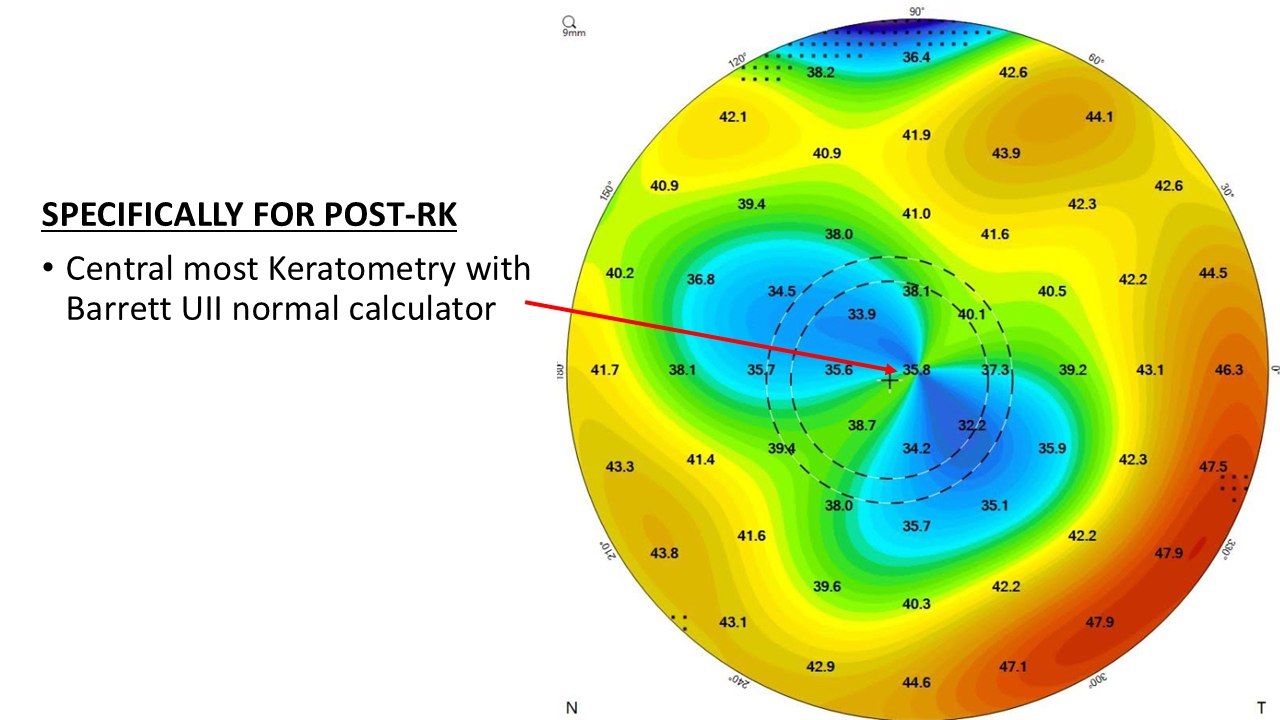
Barrett Universal II
Enter the centralmost K value from topography as both K1 and K2. This replaces the biometer's standard K readings, which average over too wide an area in post-RK eyes and overestimate corneal power.
Barrett True-K Toric
For cylinder power in post-RK eyes. Enter normal topographic K1/K2 with axes. Use the Integrated K feature, select measured PCA (not predicted PCA), and choose post-RK as the eye type.
1.6 Post-LASIK / PRK / KLEX & Irregular / Scarred Corneas
These eyes share a common challenge: standard keratometry cannot be trusted to represent true corneal power. The three formulae below account for posterior corneal changes directly. Run all three and take the average for the spherical power. For the cylinder / toric component in post-refractive eyes, use the Barrett True-K Toric calculator with measured posterior K values.
- You must use a machine that provides posterior keratometry — Pentacam, Scansys, or anterior segment OCTs. Without posterior K data, the formulae still work but accuracy is lower. With posterior K entered, accuracy is significantly better.
- Barrett True-K and EVO 2.0: Enter posterior K as K1/K2 from the posterior surface, or as the average posterior K value from your device.
- Pearl DGS: You can enter the TCRP (3 mm zone net keratometry of anterior + posterior), OR the average posterior K, OR the True K value from the IOLMaster 700 — any of these options is acceptable.
- Pre-LASIK refraction values are helpful but not essential if you have posterior K data available.
- Always select the correct eye type in the calculator: post-myopic LASIK, post-RK, post-hyperopic LASIK, etc. The wrong eye type will produce incorrect results.
- Post-refractive eyes needing a toric IOL: Use the Barrett True-K Toric calculator with measured posterior keratometry — do not use predicted PCA in these eyes.
- Spherical power = average of the three formulae below. Cylinder power and toric model = Barrett True-K Toric only.
- Scarred / irregular corneas without prior refractive surgery: Use the regular Barrett Toric calculator (Section 1.3) with measured K values — not predicted PCA — as the measured values reflect the actual corneal astigmatism including any irregular component.
Barrett True-K
Specifically designed for post-refractive eyes. Enter posterior K as K1/K2 or as the average posterior K value. Select the correct eye type (post-myopic LASIK, post-hyperopic LASIK, post-RK, etc.) in the calculator.
EVO 2.0 (with posterior K)
Enter posterior K as K1/K2 or average posterior K from your device. Accuracy is significantly improved when posterior keratometry is provided.
Pearl DGS (with posterior K)
Accepts TCRP (3 mm zone net K, anterior + posterior), OR average posterior K, OR the True K value from IOLMaster 700 — enter whichever your device provides. For post-LASIK / post-refractive / irregular / scarred cornea cases, you must select Complex Eyes mode in the calculator to unlock the posterior K input fields.
Cylinder power and toric model selection in post-LASIK / PRK / KLEX eyes should be done with the Barrett True-K Toric calculator using measured posterior keratometry. Do not use predicted PCA in post-refractive eyes.
1.7 Keratoconus / Ectasia Eyes
Keratoconus is relatively uncommon, and IOL power formulae for these eyes are still evolving — none are fully accurate. The three formulae below perform best when posterior keratometry is also entered. Run all three and take the average for spherical power. For a toric IOL, use Barrett True-K Toric in keratoconus mode for cylinder and toric model selection.
- Barrett True-K and Kane: Select keratoconus mode in the calculator — this is mandatory. Running in standard mode will give incorrect results.
- Pearl DGS: Does not have a dedicated keratoconus mode. Instead, select Complex Eyes mode — this unlocks the additional posterior K input fields needed for these cases.
- Always enter posterior keratometry alongside standard biometric inputs. Use Pentacam, Scansys, or an anterior segment OCT. Accuracy is significantly better with posterior K entered.
- Run all three formulae and take the average of their spherical power predictions.
- For a toric IOL in a keratoconic eye: use Barrett True-K Toric in keratoconus mode for cylinder power and toric model selection.
- If the steepest K is >52 D, do not target emmetropia. Set the target refraction to −1.0 to −1.5 D (mild planned myopia).
- This accounts for the increased unpredictability of IOL power calculations in steeply curved corneas — aiming slightly myopic reduces the risk of a hyperopic surprise, which is harder to correct postoperatively.
Barrett True-K
Select keratoconus mode. Enter posterior K for best accuracy. For toric IOLs in KC eyes, use Barrett True-K Toric in keratoconus mode for cylinder power and toric model selection.
Kane Formula
Select keratoconus mode. Enter posterior K alongside standard biometric inputs. Take the average with the other two formulae.
Pearl DGS
No dedicated KC mode — select Complex Eyes mode instead. This unlocks posterior K input fields. Accepts TCRP, average posterior K, or True K from IOLMaster 700.
1.8 IOL Power in Refractive Surprises
When the first eye gives an unexpected refractive outcome, the Pearl DGS formula has a dedicated Second Eye feature that uses the first eye’s result to improve the second eye’s IOL power prediction using AI-based adjustment.
- Open the Pearl DGS calculator and select the Second Eye option.
- Enter the first eye’s biometric data, the IOL power that was implanted, and the actual postoperative refraction achieved in that eye.
- Then enter the second eye’s biometric parameters as usual.
- The calculator uses the refractive outcome of the first eye as an AI-assisted personalisation signal — it adjusts the second eye’s predicted IOL power based on what the first eye actually achieved, reducing the chance of repeating the same error.
1.9 Toric Surprise / Residual Cylinder
The Barrett Rx formula is a single calculator that handles all three scenarios for managing residual cylinder after toric IOL implantation: rotation of the existing IOL, exchange for a new toric IOL, or piggyback IOL implantation. Enter all the required details and the calculator will show you the predicted outcome for each option.
- Enter the postoperative refraction, the current IOL details (power and axis of placement), and the biometric parameters — AL, ACD, pre-op Ks, and post-op Ks.
- Planning only a rotation? Enter the same IOL power as currently implanted in the “new IOL” field. The calculator will show how much refractive cylinder will be corrected with rotation alone, and to what axis.
- Planning an exchange? The calculator will suggest the optimal power and axis for a replacement toric IOL and show the predicted refractive outcome.
- Piggyback option: The calculator also provides a piggyback IOL power if that route is being considered. However, if piggyback is the chosen approach, individual company-specific calculators are better suited for precise sizing and power selection for that indication.
SIA Calculators
Two tools developed by Dr. Khatib for measuring and auditing surgically induced astigmatism using vector mathematics.
SIA Calculator
Enter your pre-op astigmatism (magnitude and axis) and the post-op astigmatism. The calculator uses vector mathematics to give you the axis and magnitude of your surgically induced astigmatism — how much flattening was induced, and at which meridian.
- Enter the pre-op astigmatism magnitude (in D) and axis (in degrees)
- Enter the post-op astigmatism magnitude and axis
- The output gives you the SIA magnitude and axis — the vector of flattening your incision induced
- Use this SIA value when planning toric IOLs for future cases
SIA Error Calculator
Used alongside the SIA Calculator. Enter the SIA you measured for a case, your incision axis, and the SIA you were expecting — the calculator then shows what your refractive error would have been at every SIA from 0 to 0.5 D. This tells you which SIA assumption would have given you the least error, and which the most. Supports batch processing across many cases to find your ideal SIA, all calculated by vector mathematics.
LASIK & Refractive Tools
Three tools by Dr. Khatib for LASIK pre-operative safety, Contoura planning, and presbyopic LASIK on the Alcon WaveLight platform.
LASIK Pre-op Safety Calculator
Enter refraction, pachymetry, flap thickness, optic zone, keratometry, and mesopic pupil for both eyes. The calculator checks ablation depth, residual stromal bed (RSB ≥300 µm), percent tissue altered (PTA ≤40%), post-op corneal curvature limits, and pupil vs optic zone — flagging any unsafe parameters with a clear verdict per eye.
iSMART — Contoura LASIK Planning
A specialized vector mathematics-based software for Contoura topography-guided LASIK on the Alcon WaveLight platform. It calculates astigmatism from all components of the eye — anterior cornea, posterior cornea, and lens — then derives the final treatment refraction. Inputs are taken from the higher-order ablation profile map on the Alcon WaveLight Planning PC. The software also performs nomogram correction. This is only for Contoura LASIK.
ZOOM Simulator — Presbyopic LASIK
A niche, highly specialized software for hyperopic presbyopia on the Alcon WaveLight platform. Uses controlled asphericity modulation for presbyopia (CAMP methodology) — Q value modulation from both eyes combined with monovision to simulate binocular vision outcomes. Optimized specifically for hyperopic presbyopic LASIK cases.
IOL Power Calculation — Case Discussion
For complex cases — post-refractive, extreme biometry, keratoconus, or refractive surprises — submit your case for a personalized discussion. Include biometry printout, topography, and prior refraction history where available.
- Complex post-refractive eyes
- Keratoconus / corneal ectasia
- Refractive surprises & piggyback planning
- Premium IOL selection in borderline eyes